Your First AI Screening in 60 Seconds: A Visual Walkthrough
You have candidates waiting and a role to fill. You have never used AI screening before. In sixty seconds, you will have scored candidates with full reasoning for every decision. Here is exactly how it works.
Setting Up Your Screening Criteria
The first thing you will notice about GoVerse screening is that it starts with you, not with the AI. Before a single candidate is evaluated, you define what matters for this role. Think of it as writing a brief for a colleague who is going to review CVs on your behalf - except this colleague can read five hundred CVs in the time it takes you to read one.
You begin by selecting or creating screening criteria. These are plain-language statements that describe what you are looking for: "5+ years of registered nursing experience in acute care settings," or "demonstrated experience managing cross-functional product teams." You can weight each criterion to reflect how important it is relative to the others. The system does not impose its own priorities. Your criteria, your weights, your hiring philosophy.
The entire setup takes about twenty seconds. If you have screened for a similar role before, your previous criteria are saved and reusable - you can be running a new screen in under ten seconds on your next hire.
Running the Screen
With your criteria defined, you select the candidates you want to screen. These might be candidates you have sourced into GoVerse, CVs uploaded in bulk, or people already sitting in a talent pool. You click "Screen" and the AI goes to work. For a batch of fifty candidates, you are looking at results in about fifteen seconds. For five hundred, perhaps forty-five seconds. The speed is not the point - the quality of reasoning is.
While the screen runs, the system is reading each candidate's full profile: their CV, any structured data extracted during upload, and notes from previous interactions if they exist. It evaluates every criterion you set independently, producing a score and a rationale for each one. This is not pattern matching or keyword spotting. The AI reads contextually, understanding that "managed a team of twelve engineers" satisfies a leadership criterion even if the word "leadership" never appears.
Understanding the Output
When results arrive, you see a ranked list of candidates with an overall fit score. But the real value is one click deeper. Open any candidate's result and you see a per-criterion breakdown: what the AI found, what score it assigned for that criterion, and why. If a candidate scored low on a particular requirement, you will see the specific reasoning - "candidate's experience is in outpatient care, not the acute care setting specified" - not just a number.
This transparency serves two purposes. First, it lets you make informed decisions fast. You can scan the reasoning, disagree where your judgement differs, and adjust your shortlist accordingly. The AI is not making hiring decisions - it is organising information so you can make better ones, faster. Second, it creates an audit trail. Every screening decision can be explained, reviewed, and defended if challenged.
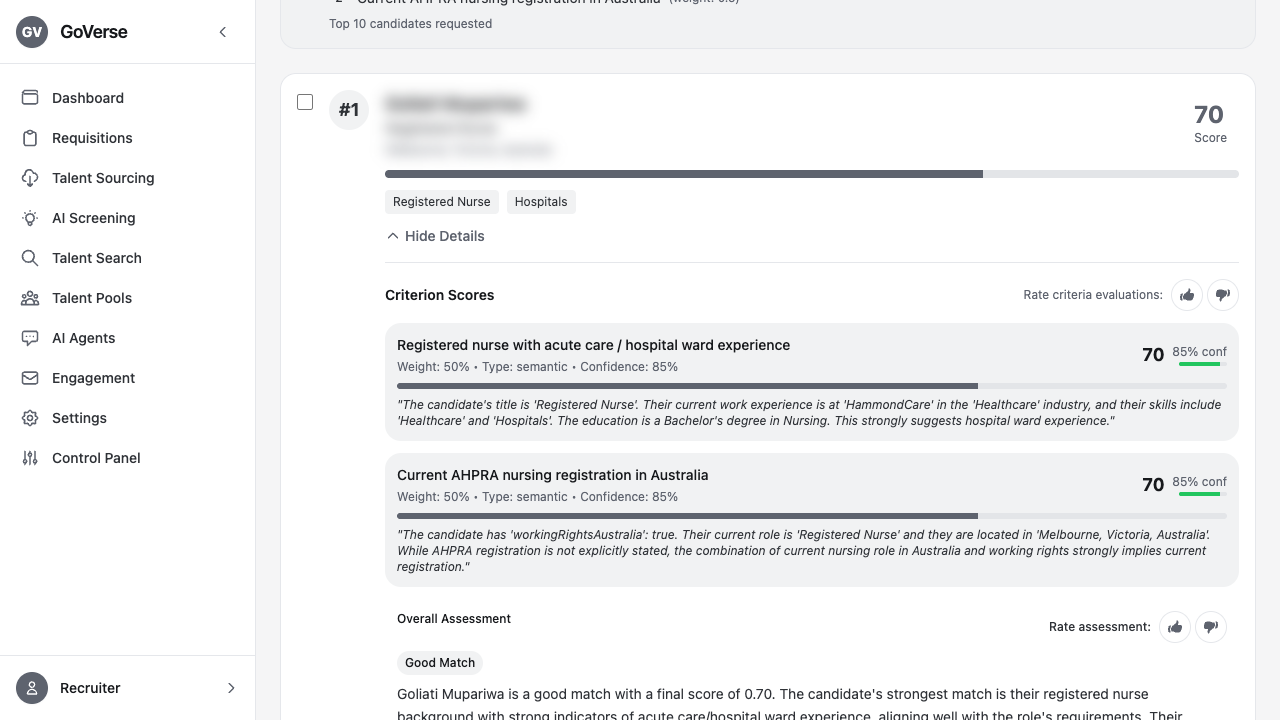
Scoring Transparency: No Black Boxes
If you have looked at other AI screening tools, you may have encountered the "trust me" problem: a score appears with no explanation of how it was derived. GoVerse takes the opposite approach. Every score is decomposable. You can see exactly which parts of a candidate's profile contributed to their evaluation, which criteria they excelled at, and where gaps exist.
This matters because recruitment decisions affect people's lives. A candidate who is rejected deserves to have that decision made thoughtfully, not by an opaque algorithm. And a hiring manager who is presented with a shortlist deserves to understand the reasoning behind it. Transparency is not a feature we added after the fact - it is the architecture. The scoring model was designed from day one to produce explanations alongside scores, not to reverse-engineer explanations from scores after the fact.
What Happens After the Screen
Your shortlisted candidates do not vanish into a spreadsheet. They stay in GoVerse where you can take immediate next steps: invite them to an interview stage, share the shortlist with a hiring manager for review, or move them into a talent pool for future roles. The screening scores and reasoning persist on their profiles, so anyone on your team who views the candidate later understands why they were shortlisted.
If your criteria evolve - perhaps the hiring manager decides they actually need cloud migration experience rather than general infrastructure - you can re-run the screen with updated criteria. Previous results are versioned, so you never lose the history. This makes GoVerse screening a living process rather than a one-shot filter.
Getting Started Today
You do not need to configure integrations, import your entire ATS database, or sit through a training session. Upload a handful of CVs, write two or three criteria that matter for a role you are hiring for right now, and run a screen. In sixty seconds you will understand exactly how AI screening works - not as an abstract concept, but as a practical tool that just saved you an afternoon of manual CV review.
The recruiters using GoVerse today started exactly where you are. They tried one screen, saw the reasoning, and never went back to reading every CV from top to bottom. The shift happens that fast because the value is that immediate.
The 60 seconds a first-time user actually spent
I sat with a recruiter doing her very first screen. She had never used AI screening and, by her own admission, expected it to be either magic or nonsense with no middle ground. Her opening question was practical: "What do I even type in the criteria box?" That is the real starting hurdle, not the running of the screen but knowing what to write.
I told her to write it the way she would brief a colleague covering for her. She typed three lines: five years of registered nursing in acute care, current AHPRA registration, and experience on rotating shifts. That took about twenty seconds. She selected a batch of fifteen candidates she had uploaded, clicked Screen, and the results came back in a few seconds. Her first reaction was to sort by the top score, which is what everyone does. Then she opened the breakdown on the candidate ranked fourth and read why. The reasoning said the candidate's acute-care experience was strong but their most recent role was outpatient, so it had marked that criterion partially met. She said, out loud, "That's exactly what I'd have flagged." That was the sixty seconds that turned her from sceptic to user.
Before and after, in her own words
Before, her screening was reading each CV, forming a gut impression, and jotting a shortlist on paper. Fast for a handful, exhausting past twenty, and she admitted she could not always explain later why one candidate made the list and another did not. If a hiring manager pushed back, she was reconstructing her reasoning from memory.
After, every candidate had a score and a written rationale she could point to. The shift she noticed was not just speed on that batch of fifteen. It was that when the hiring manager asked why candidate seven was below candidate three, she opened the breakdown and showed him, rather than defending a gut call. The audit trail was there without her having to create it.
The override is the point, not a workaround
She worried that disagreeing with a score meant she was fighting the tool. The opposite is true. On her second screen she kept a candidate the AI had ranked low because she knew the employer on their CV had a stronger training programme than the CV conveyed. The score organised the information; her judgement made the call. That is the intended division of labour, and understanding it early is what makes people comfortable.
What confused people at first
The first stumble was vague criteria producing flat scores. When everyone comes back scoring in the same narrow band, it is almost always because the criteria were too general to separate people. "Team player" tells the AI little. "Has led a shift team of five or more" gives it something concrete to read for. New users who complained the scores all looked the same nearly always had criteria that were too soft.
The second was expecting the overall number to be the answer. The overall fit score tells you where to look first, not who to hire. The value is one click deeper, in the per-criterion reasoning, and especially on the candidates scoring in the middle where a human read matters most. People who stopped at the top-line number got less out of it than people who opened the breakdowns.
One thing we still want to improve
Reusing criteria is fast once you have screened a similar role, but organising a growing library of saved criteria is still rougher than it should be. A recruiter who has run thirty screens ends up with a long list of saved criteria sets and not much structure to find the right one quickly. We want better naming, grouping, and search for saved criteria, so returning to a role type six months later is a two-second lookup rather than a scroll. It is a papercut rather than a blocker, and it is on our list. My tip in the meantime: name your criteria sets clearly the first time you save them, because future-you will thank present-you when the next similar role opens.
See it for yourself
Upload a few CVs, set your criteria, and run your first AI screen in under a minute. No credit card required.
Start free trial →